Create Your First Map
Your Peerdom map is a visual representation of how your organization works: who does what, and how teams connect. Here is how to build yours.
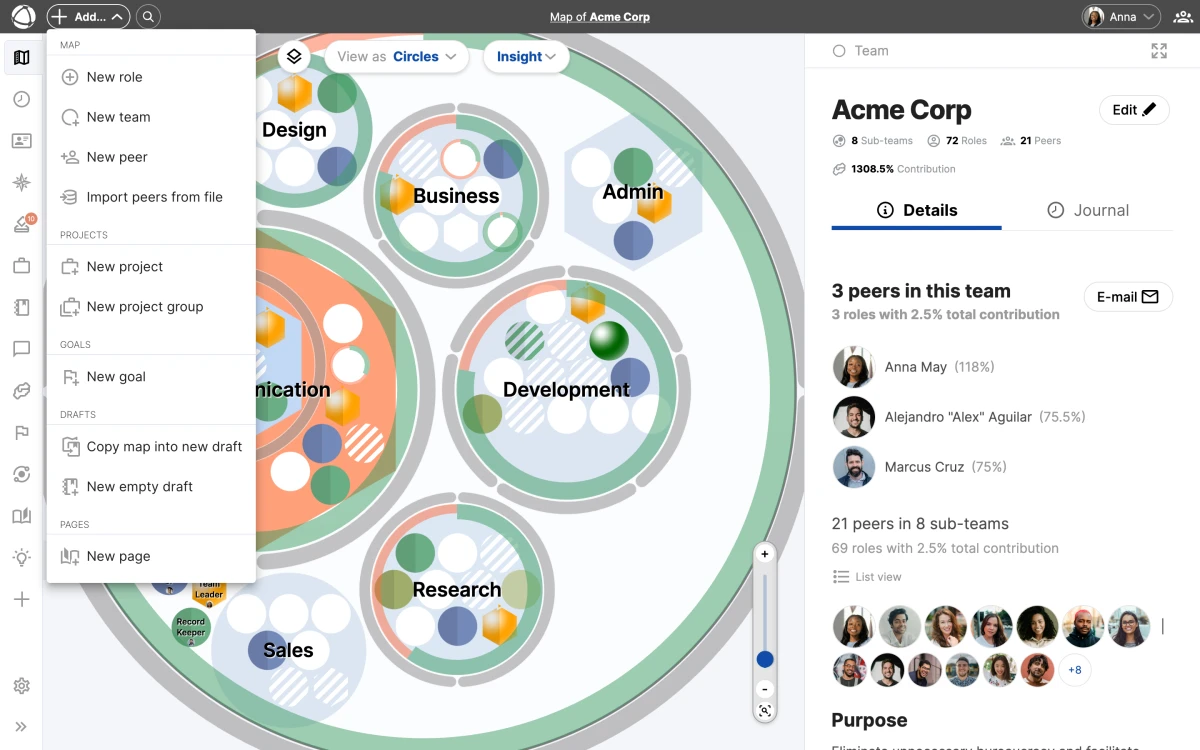
Create your account
- Create your free account
- Enter your organization name
- You start as the Owner with full administrative access
Build your structure
Your map is made of two building blocks:
- Circles (groups): containers that organize related roles and sub-circles
- Roles: sets of responsibilities held by people
Start by creating circles for your main teams or departments, then add roles within them.
Add a circle
- Click + Add in the top toolbar
- Select New Group
- Give it a name and purpose
- Save
Add a role
- Click + Add in the top toolbar, or right-click inside a circle
- Select New Role
- Add a name, purpose, and responsibilities
- Save
Not sure about all the details yet? Start with names only. You can refine descriptions later.
Add people
Once your structure exists, assign people to roles:
- Select a role on the map
- Click Assign in the Inspector panel
- Search for and select a person
- Save
Unassigned roles appear striped on the map, making it easy to spot gaps. You can also drag and drop items to rearrange your structure.
Next steps
Once your map is ready, invite your team so colleagues can explore the structure. Check the Editor Quick Reference to learn what you can do day-to-day, or explore apps like Goals, Projects, and Feedback to add more context to your map.
Related
- Invite Your Team: bring your colleagues into Peerdom
- Circles & Groups: learn about organizing your structure
- Roles: understand role types and properties
- Editor Quick Reference: what you can do as an Editor